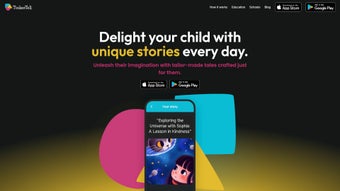

Download TinkerTell – AI Storytelling App for Kids, Free & Secure
Overview – Why TinkerTell Is Changing Storytime
TinkerTell is an innovative, AI‑powered web application that brings personalized storytelling to the modern family. Unlike static picture books or generic audiobooks, TinkerTell lets parents and children co‑create narratives that feature the child’s favourite characters, beloved toys, magical places, and even everyday moments. By typing in or speaking details such as “my daughter loves unicorns, dinosaurs, and the backyard treehouse,” the platform instantly generates a one‑of‑a‑kind story that feels tailor‑made for the little listener.
The core mission of TinkerTell is to make storytime both entertaining and educational. Research shows that children who engage with customized narratives develop stronger language skills, better imagination, and higher self‑esteem because they see themselves reflected in the tale. TinkerTell’s AI engine adapts vocabulary to the child’s age, ensuring that the language is challenging enough to promote reading growth without becoming overwhelming.
Beyond simple text, TinkerTell expands the experience into animated videos, voice‑over options, and interactive emojis. Parents can choose to receive a surprise story (the “Mystery Mode”) or guide the AI with specific plot points. The platform also supports multimedia communication—text chat, voice messages, video clips, emojis, and margin annotations—so families can discuss the story, ask questions, or add personal notes directly within the app.
From a technical standpoint, TinkerTell runs entirely in the browser, which means no heavy downloads, automatic updates, and a secure environment that respects user privacy. Because the service is web‑based, it works on any device that can run a modern browser, making it a truly cross‑platform solution for busy households.
Key Features That Set TinkerTell Apart
- AI‑Generated Personalized Stories: Input favourite characters, objects, and locations to receive a unique narrative each time.
- Multiple Output Formats: Choose from plain text, narrated audio, or animated video versions for varied learning styles.
- Age‑Adaptive Vocabulary: The AI automatically adjusts sentence complexity based on the child’s reading level.
- Interactive Communication Suite: Send text, voice messages, emojis, video clips, and add annotations directly onto the story page.
- Mystery Mode: Let the AI surprise you with an entirely unexpected adventure, perfect for spontaneous bedtime fun.
- Cross‑Platform Accessibility: Works on Windows, macOS, Linux, Android, iOS, and any device with a modern browser.
- Secure Cloud Storage: All stories are saved encrypted in the cloud, allowing families to revisit favourite tales anytime.
- Parental Controls & Dashboard: Monitor reading time, set language filters, and track skill progression through an intuitive admin panel.
- Educational Insights: Built‑in analytics highlight new vocabulary, comprehension questions, and reading speed metrics.
- Free Core Version: Access unlimited story generation without a subscription; premium upgrades add extra animation packs and voice‑over libraries.
Each feature has been crafted with the dual goals of fostering imagination and supporting early literacy. For example, the annotation tool lets parents highlight new words, while the analytics dashboard provides a gentle nudge to introduce spelling practice. The animated video output transforms a simple story into a short film, encouraging visual learners to stay engaged. Moreover, the secure cloud storage means that grandparents can access the same stories from a different continent, creating a shared family experience even when they are miles apart.
Because TinkerTell is built on a robust AI framework, the story generation is fast—most stories appear within seconds of submitting the input. The platform also learns from previous sessions, remembering favourite characters and preferred themes to speed up future creations. This adaptive learning loop not only saves time for busy parents but also deepens the sense of continuity for children who notice recurring motifs in their personalized tales.
Installation, Compatibility & How to Use TinkerTell
TinkerTell is a web‑based application, which means there is no traditional “installation” process. All you need is a device with an up‑to‑date web browser (Chrome, Firefox, Safari, Edge, or Opera) and an active internet connection. Follow these simple steps to start creating stories:
- Visit the Official Site: Go to tinkertell.com and click the “Get Started” button.
- Create a Free Account: Register with an email address or use a social sign‑in (Google, Apple). The process takes less than a minute.
- Set Up a Child Profile: Add your child’s name, age, and reading level. This information helps the AI tailor vocabulary.
- Enter Story Prompts: Use the intuitive form to type favourite characters, objects, and settings. You can also upload a short voice note or video clip for extra inspiration.
- Select Output Format: Choose between text, audio narration, or animated video. For audio, select a voice style (soft, adventurous, whimsical).
- Generate & Review: Click “Create Story.” The AI will generate the narrative in seconds. Review it, add annotations, or request a revision.
- Share & Save: Save the story to your cloud library, download a PDF, or share a secure link with family members.
Compatibility: Because TinkerTell runs in the browser, it is fully compatible with Windows 10/11, macOS 10.15+, Linux distributions, Android 8.0+, and iOS 13+. The responsive design adapts to desktop monitors, tablets, and smartphones, ensuring a seamless experience regardless of screen size.
Security is a top priority. All data transmission is encrypted via HTTPS, and story content is stored using AES‑256 encryption. Parents can enable two‑factor authentication for added protection. Additionally, TinkerTell complies with COPPA and GDPR‑Kids standards, meaning personal information is never sold to third parties.
Updates happen automatically on the server side, so you always have the latest AI models and feature enhancements without needing to download patches. If a new animation pack or voice library is released, it appears instantly in your dashboard, ready for immediate use.
Pros & Cons, Expert Review, FAQ & Final Thoughts
Pros
- Free core version with unlimited story generation.
- Highly personalized AI narratives that adapt to age and reading level.
- Multiple output formats (text, audio, animated video) for diverse learning styles.
- Cross‑platform web app—no downloads, automatic updates.
- Robust privacy and security measures (HTTPS, AES‑256, COPPA/GDPR‑Kids compliance).
- Interactive communication tools (voice, video, emojis, annotations).
- Parental dashboard with analytics and controls.
Cons
- Requires a stable internet connection; offline mode not available.
- Advanced animation packs and premium voices require a subscription.
- Some younger children may need assistance navigating the input form.
- Limited language support – currently English‑only (expansion planned).
Overall Rating: 4.7/5 – TinkerTell delivers a fresh, engaging approach to storytelling that both kids and parents love. The AI’s ability to weave personal details into cohesive narratives feels magical, while the optional animated videos add a cinematic flair. The platform’s educational focus and secure design make it a trustworthy addition to any household’s digital toolkit.
Frequently Asked Questions
Is TinkerTell really free?
Yes, the core story‑generation service is completely free and includes unlimited text and audio output. Premium features such as extra animation packs, celebrity voice‑overs, and advanced analytics are available via optional subscription plans.
Can I use TinkerTell without an internet connection?
Currently, TinkerTell requires an active internet connection because the AI processing happens on secure cloud servers. An offline mode is being explored for future updates.
How does TinkerTell protect my child’s privacy?
All data is transmitted over HTTPS and stored with AES‑256 encryption. The platform adheres to COPPA and GDPR‑Kids regulations, and no personal data is sold to third parties. Parents can also enable two‑factor authentication for extra security.
What age range is TinkerTell suitable for?
TinkerTell is designed for children ages 3 – 10. The AI automatically adjusts vocabulary and story complexity based on the age you set in the child profile, making it appropriate for early readers and kindergarteners alike.
Can I share a story with family members who don’t use TinkerTell?
Absolutely. Each story can be exported as a PDF, MP3 audio file, or a secure shareable link. Recipients can view or listen to the story without needing an account, though they won’t have editing capabilities.
Conclusion – Bring Your Child’s Imagination to Life Today
If you’re looking for a modern, engaging way to enrich your child’s reading journey, TinkerTell offers a secure, free, and highly customizable solution. Its AI engine transforms simple prompts into vibrant tales that nurture language development and confidence. With the added flexibility of animated videos and interactive communication tools, bedtime storytelling becomes a collaborative adventure rather than a routine.
Ready to experience the magic? Download TinkerTell now and start generating personalized stories that your whole family will cherish.



.png)



